Claude Fable 5.2 in Practice: What It Did Well and When a Cheaper Model Is Enough
Dette innlegget finnes foreløpig bare på engelsk.
Innhold
Anthropic released Claude Fable 5.2 on 9 November 2026. In the days after the launch I tried it through my Pro plan and its included trial, which runs until 16 November 2026. I used it heavily on this very website, most of it in one long evening session in Claude Code.
This is not a benchmark review. It is what I saw when I gave the model real work, and what I would use it for next time.
The short version of what it is
Claude models come in tiers: Haiku is small and cheap, Sonnet is the everyday workhorse, Opus is the strong general model, and Fable sits on top. Fable 5.2 is the newest Fable. It is meant for long, open-ended tasks where the model plans the work and keeps going on its own.
| Fable 5.2 | Opus 5.5 | Sonnet 5.5 | |
|---|---|---|---|
| Input, per million tokens | $8 | $4 | $2 |
| Output, per million tokens | $40 | $20 | $10 |
| Context window | 1 million tokens | 1 million tokens | 1 million tokens |
So Fable costs twice as much as Opus and four times as much as Sonnet. It is 20% cheaper than the previous Fable, and Anthropic says it is up to 30% faster.
According to Anthropic's own numbers, the biggest jumps from Fable 5.1 are in long, independent work: paid freelance-style tasks (18% to 41% completed), business workflows (31% to 51%) and agentic coding (32% to 49%). Reading charts also improved a lot. Against Opus 5.5 the gap is smaller on ordinary coding (46% against 49%) and widest on those long, multi-step jobs. That matches what I saw: the difference shows when the task is big.
What I used it for
1. Adding a second language to the whole site
My prompt was one sentence:
Is it possible to add Norwegian in addition to my site. Like a locale button NO/EN, default to english or based on their current location.
It did not start coding. It first told me how it would do it, recommended following the browser language instead of location (a Dane in Norway would otherwise get the wrong language), and asked me three questions. After I answered, it built the whole thing in one go: Norwegian pages under /no, a language toggle, a redirect for Norwegian browsers, translated content, a Norwegian CV with its own PDF, and the search-engine tags that tell Google the two versions belong together. It touched around fifty files. Then it tested its own work in a browser and ran a production build before telling me it was done.
Would Opus have done this? Probably, but I think in more rounds. The hard part was not any single file. It was keeping fifty changes consistent: every link had to stay in the right language, on two subdomains. This is the kind of job where I would pay for Fable again.
2. Making the site faster
The header feels a bit sluggish. The titles should have an animation or some sort of indication that it is a link. Do a full optimization to speed up the site
I expected some CSS. Instead it measured the live site first and found something I had not asked about: every page was being rendered on a server in the United States, for a site whose visitors are in the Nordics. It moved rendering to Stockholm, made the header links load their pages in the background, and added the hover effect I asked for. A click on a header link went from around half a second to about 30 milliseconds in a production build.
Would Opus have done this? The hover effect, yes, and so would Sonnet. Finding the server location is the part I am less sure about. It came from measuring before changing anything, and that habit is what I noticed most with Fable.
3. Where it struggled: a download button
Not everything went smoothly. The CV page got a dropdown for downloading the English or Norwegian PDF, and in Safari the button did nothing. It took three rounds. The model never found out why Safari ignored it. In the end it rebuilt the button in a simpler way that does not depend on JavaScript, and that worked.
Would Opus have done better? I doubt the model was the limit here. It could not test in Safari, so it was guessing. A cheaper model would have reached the same fix at a lower price. A top model does not help when the problem is that nobody can see the bug.
4. For comparison: the design system, built with Sonnet
Earlier the same week, before I switched models, I asked Claude Sonnet 5.5 to document the design of this site:
Based on the current design system, use Claude Design to create a design book. Feel free to add or adjust elements to make the site more coherent. Do not implement it on the site just yet. Let me review the artifact first
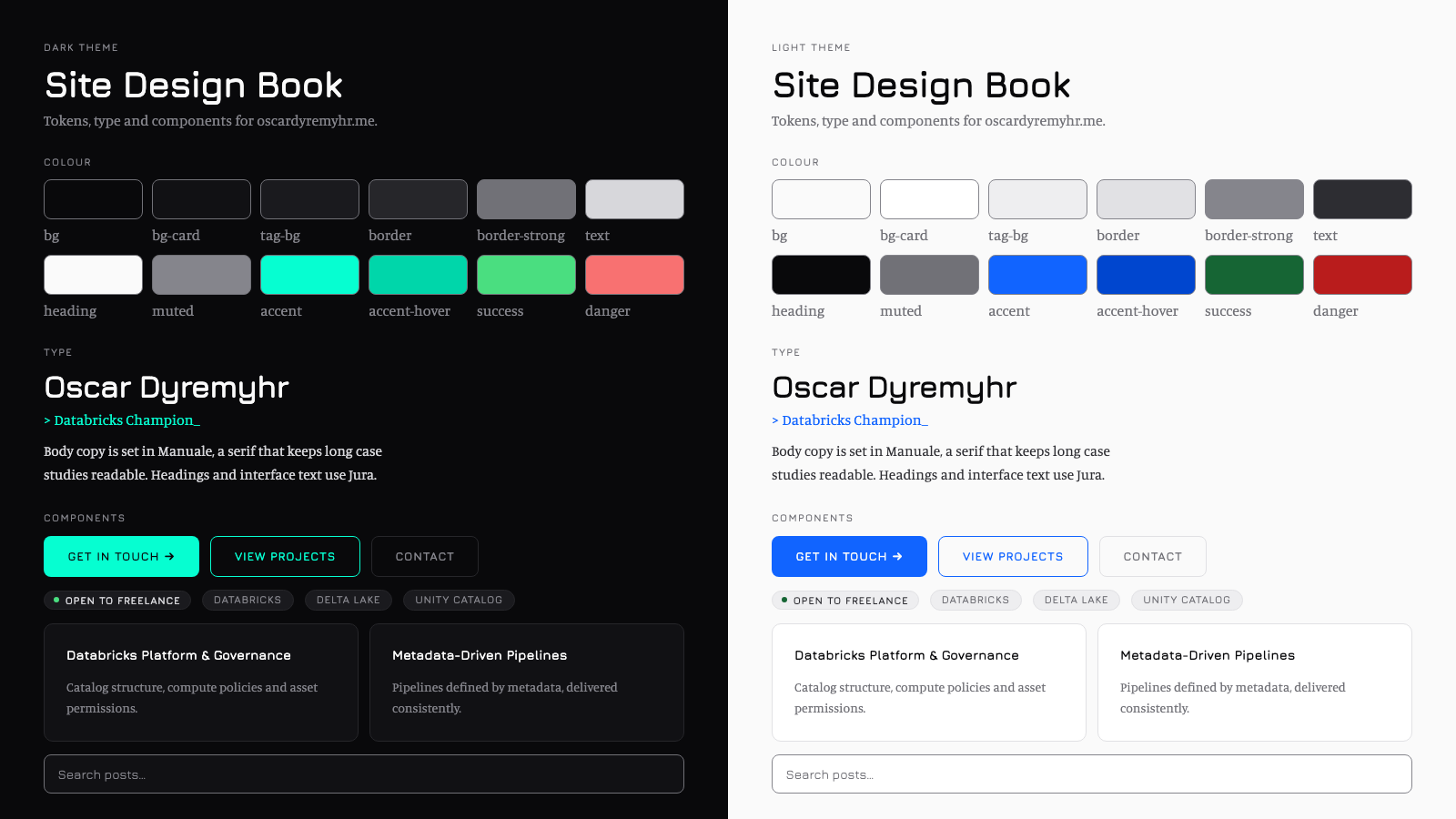
That turned into the colours, type and components the site now uses. You can see them live on the style guide page.
Sonnet handled this well, and it is a good example of when the top model is not needed. The task was clear, it had a natural end, and I reviewed the result before anything was applied. Paying four times as much would not have made the design book better.
What it cost
Claude Code logs every model call, so I added up the Fable 5.2 work. This covers about four hours:
| Tokens | Cost at API prices | |
|---|---|---|
| Output | 139,000 | $5.57 |
| Input read from cache | 52.1 million | $10.42 |
| Input written to cache | 735,000 | $11.76 |
| Total | about $28 |
I did not pay this. The work ran on my Pro plan, so $28 is what the same work would cost through the API. Almost all of the input is cached: in a long session the model re-reads the conversation on every step, and caching is what keeps that affordable. Without it, the same input would have cost over $400.
For an evening that produced a second language for the whole site and a clearly faster one, $28 is cheap. For fixing a button, it is not.
When I would use it, and when not
Use Fable 5.2 when:
- The task is large and touches many parts. A migration, a new language, a restructuring. Consistency across many files is where it earned its price for me.
- You cannot fully describe the task up front. It asks good questions and looks for the real cause before changing things.
- A wrong answer is expensive. It checks its own work more than the cheaper models I have used.
Use Opus or Sonnet when:
- The task is well scoped. A design document, a single component, a bug you can already point at.
- You are going back and forth in small steps. Trying layouts or wording is many small rounds, and the cheaper model is quicker and costs a fraction.
- The model cannot see the problem. If the bug only shows in a browser or system it cannot test, a stronger model is still guessing.
One caveat: I did not run the same tasks on Opus 5.5, so the comparisons above are my judgement, not a measurement. What I can compare directly is Sonnet 5.5 earlier in the week, and there the difference was clear on the big jobs and hard to see on the small ones. Anthropic's own advice points the same way: Opus for most daily work, Fable for the ambitious tasks.
Sources
Kommentarer